Skip to content

GTreasury is now Ripple Treasury

Product Information

See reconciliation health in real-time with the Cash Reconciliation Dashboard

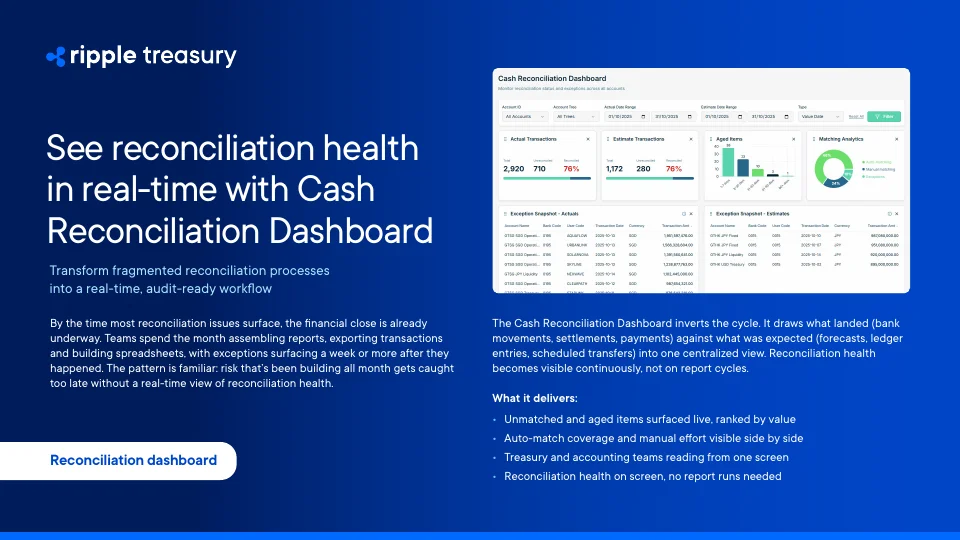
The Cash Reconciliation Dashboard gives treasury and accounting one live view of what landed against what was expected, so exceptions surface in real time instead of a week later in the next report.
See Ripple Treasury in action

Get connected with supportive experts, comprehensive solutions, and untapped possibility today.
Product Information

See reconciliation health in real-time with the Cash Reconciliation Dashboard

The Cash Reconciliation Dashboard gives treasury and accounting one live view of what landed against what was expected, so exceptions surface in real time instead of a week later in the next report.

Challenge

The visibility gap in manual reconciliation

Traditional reconciliation runs in cycles: pull a report, review exceptions, build a status view before the next checkpoint. But cash movements, settlements, and bank files do not wait for that schedule. A treasury analyst might pull the cash report on Monday, only to find that by Wednesday several transfers have settled differently than booked. By the time the next report runs, those items are a week old and competing with newer entries for attention. That gap creates real operational drag: unmatched value sits invisible until the next report run, aged items accumulate quietly without real-time filtering, and auto-match coverage can drift for weeks without anyone noticing. Close preparation becomes an exercise in assembling status views rather than resolving exceptions, and risk that built up all month gets caught too late.

Solution

The Cash Reconciliation Dashboard, built for real-time visibility

It draws what landed, bank movements, settlements, and payments, against what was expected, forecasts, ledger entries, and scheduled transfers, into one centralized view. Reconciliation health becomes visible continuously, not on report cycles.

It makes three structural moves on the existing process: periodic checks become continuous monitoring, raw volume gives way to materiality-ranked exceptions, and manual effort becomes measured, visible coverage.

Key Benefits

Continuous, not periodic

Actuals, expected items, and unmatched balances refresh as data lands. Treasury and accounting work from the same live state instead of the same static report.

Ranked by materiality

Unmatched items surface ranked by value, and the aged-items view groups exposure by how long it has been outstanding, so the biggest, oldest, most material risk shows up first.

Measured match coverage

Auto-match coverage shows as a percentage rather than an assumption, so when manual effort starts to creep, leadership sees it before it becomes a staffing problem.

One shared screen

Treasury and accounting teams read from the same dashboard instead of trading exports and email lists, closing the gap between the two functions.

Audit-ready by design

Reconciliation health is visible on screen at any moment, with no manual report runs required to answer a status question.

Key Features

Live aged-item ranking

Unmatched and aged items are surfaced live and ranked by value, so the largest exposures are never buried in a longer list.

Matching analytics

Auto-match coverage and manual matching effort are shown side by side, making drift visible as soon as it starts.

Shared treasury and accounting view

Both teams filter, sort, and drill into the same live data set instead of reconciling from separate exports.

Instant reconciliation health

Reconciliation status is available on screen at any time, removing the need to build a report before answering a status question.

Use Cases

Cross-account exception monitoring

Filter by account to see totals, percentages, and aged items across all accounts instantly instead of consolidating multiple reports by hand.

Prioritizing high-value exceptions

Use the exception snapshot to see the top exceptions by value without exporting transactions or sorting them in a spreadsheet.

Month-end aged-item escalation

Catch aged items piling up before month-end using the aged-items widget, and escalate them before they become material.

On-demand reconciliation health checks

Open the dashboard for an instant answer on reconciliation health instead of manually building a status report.

Frequently asked questions

How many items are unreconciled across all accounts?

Filter by account and the dashboard shows totals, percentages, and aged items instantly, instead of running and consolidating multiple reports by hand.

Which exceptions should we prioritize?

The exception snapshot surfaces the top 20 exceptions by value with no exports needed, instead of sorting transactions in a spreadsheet.

Are aged items piling up before month-end?

The aged items widget groups exposure by date so you can escalate before it becomes material, rather than discovering it late in the close cycle.

Can I view reconciliation health instantly?

Yes. Open the dashboard for an answer on the spot instead of manually building a reconciliation health report.

How do I get started with the Cash Reconciliation Dashboard?

If you’re already on Ripple Treasury, access it directly from the Treasury Portal. If you’re still reconciling in spreadsheets, schedule a demo using your own recent close, accounts, and bank feeds.

Conclusion

Live in three clicks

The Cash Reconciliation Dashboard is embedded within Ripple Treasury, so it is available the moment you activate the module: set your account and date filters, let the dashboard populate automatically, and drill into exceptions and aged items. Teams already on Ripple Treasury can access it directly from the Treasury Portal, while teams still reconciling in spreadsheets can schedule a demo using their own recent close, accounts, and bank feeds.

See Ripple Treasury in action

Get connected with supportive experts, comprehensive solutions, and untapped possibility today.